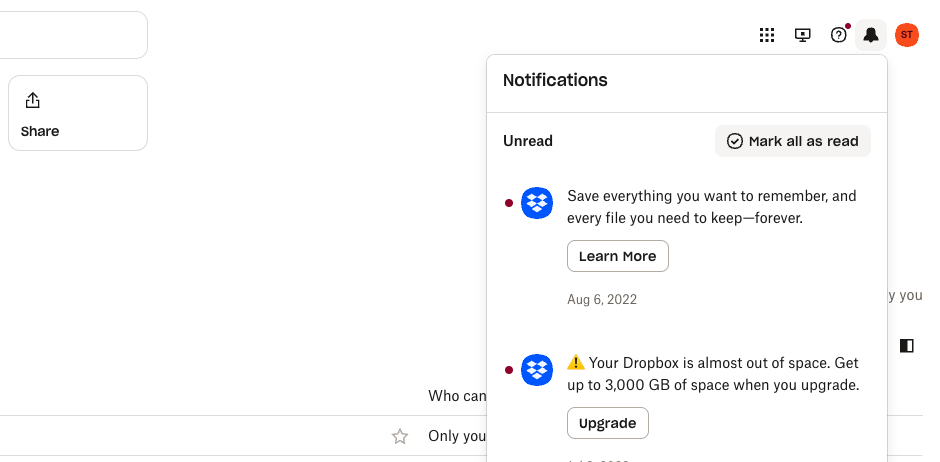
Dropbox Notifications
Client Problem Statement
The Dropbox notification system, an outdated platform untouched for over five years, struggled to effectively engage users.
Notifications were not successfully encouraging the key behaviors of sharing and collaboration—core to Dropbox's value.
The Engineering, Product, and Design (EPD) teams hypothesized that improving the quality of notifications and giving users more control over them could build trust and boost engagement. Tackling this challenge required a multi-phase research program spanning several quarters.
Objectives + Structure
Project Objectives
Understand user sentiment on Dropbox notifications and define high-quality notification experiences.
Identify opportunities to streamline notification and activity feeds for clarity and engagement.
Develop actionable insights to inform notification design and management across teams and platforms.
In collaboration with Design, propose a future-state vision for Dropbox notifications
The research spanned three core studies
What Makes a Quality Notification?
Notifications for Teams
Notifications vs. Activities
High Level Timeline + Research Tools
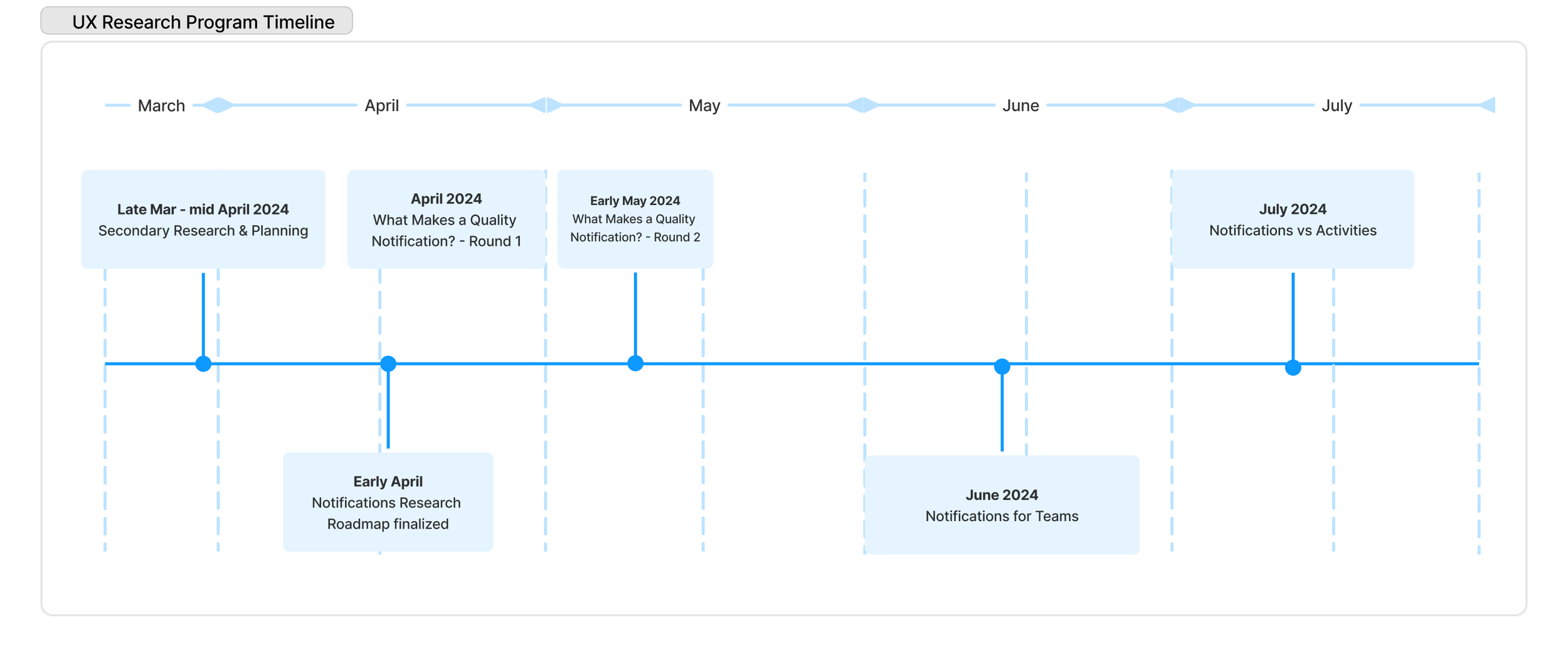
Project timeline and key activities
Research toolkit
User Interviews: Participant panel management and coordination
Zoom Webinar: Video conferencing with large audience management
UserTesting: Large-scale participant recruitment and task completion.
FigJam: For collaborative co-design and visual aid presentation with participants.
Optimal Workshop: Open and closed card-sorting exercises.
Miro: Affinity diagrams and visual lit reviews
Google Sheets: quantitative coding and analysis.
Literature Review: What do we already know?
Problem statement
Although no original architects or subject matter experts on remain, past explorations by researchers and product managers are documented. The topic of notifications has also surfaced in other research efforts. This information is scattered across various sources, making it difficult to piece together as a whole.
Research Objective
Review existing literature on Dropbox notifications to:
Understand user pain points and opportunities
Define areas of ambiguity requiring further investigation
Methodology
Literature Review
UX Research libraries (current and archived)
External sources + industry best practices
Triangulation with Research & Insights colleagues
Key Findings + Deliverables
Affinity Diagram
An interactive Figjam that connects existing research into a clear narrative, focusing on:
Design principles - historical guidelines for building an effective notification system.
Recent user feedback - what Dropbox customers are saying about notifications, categorized by platform (web, desktop, mobile).
User flow analysis
Auditing the current notification experience with Product Design.
Heuristic analysis using Tenets & Traps framework
Linking pain points and opportunities to existing literature (reports, user quotes, etc)
Artifacts
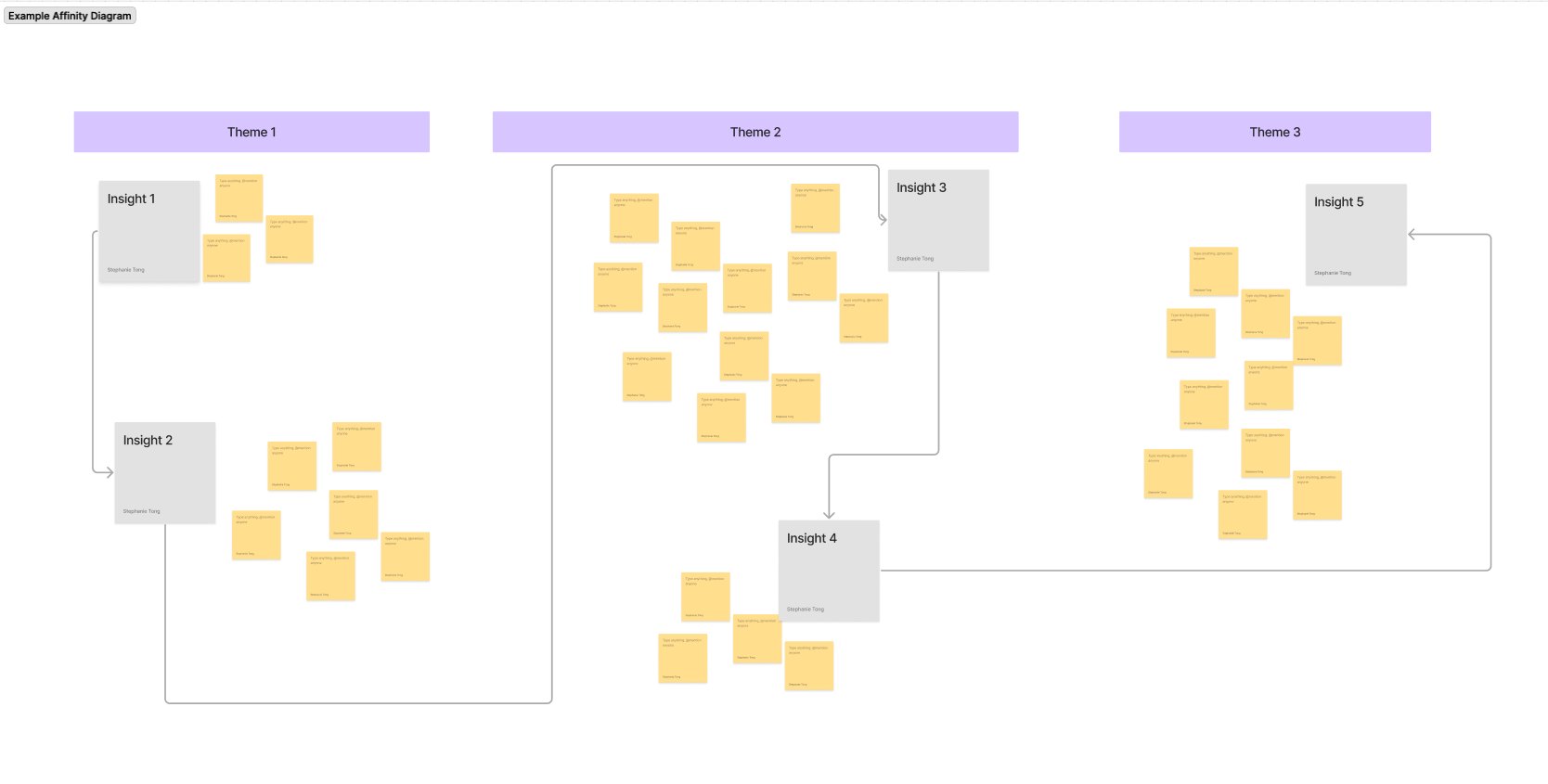
An example affinity diagram displaying themed evidence, including excerpts from reports or user quotes. Thematic evidence is summarized into broader insights and organized under themes.
Business Outcomes
Onboarding the new team: Getting Engineering, Product, and Design (EPD) teams up to speed on the subject.
Research Prioritization+ Q2 UXR roadmap: Team brainstorm to identify open research questions, categorized by:
Importance: Ranked using dot voting
“Fuzziness”: Confidence in strength of hypotheses
Roadmap Fit: Where each question aligns with the broader product roadmap.
The final research roadmap was designed to focus on P0-P1 research questions, considering timelines and UX Research availability.
Research Ownership:
UX Research - Complex, foundational research
Product Design: Usability / concept testing
Product & Engineering: In-product experimentation
Study 1: What makes a quality notification?
Problem statement
Dropbox connects with its users through various channels, but the team had defined "notifications" as a specific product area without knowing if users share the same understanding of the term. They also wanted to gather evidence to determine whether the initiatives outlined in their work-in-progress notification roadmap were appropriately prioritized.
Research Questions
How do users define a notification, and what makes it high quality?
What content and actions are essential for a high-quality notification?
How do users perceive different notification types (e.g., error, informational, actionable)?
Can preferences from other systems apply to Dropbox notifications?
What is the ideal notification frequency for documents, actions, and collaborators of varying priority? How should important notifications be surfaced?
Which notifications do users interact with the most?
Where should notifications appear (e.g., surfaces, channels, integrations)?
How should notifications across multiple surfaces be managed?
Methodology
Round 2 - Unmoderated study
50-60 unmoderated participants from target industries to review key assumptions from Round 1 and understand firmographic nuances.
Hybrid card sort: Categories refined by EPD.
Open-ended questions: What needs to be in a notification to make it valuable? What types of notifications do you receive that are most valuable for your job and why?
Round 1 - Moderated interviews
14 moderated interviews (60 minutes each) to explore notification experiences, coupled with open-ended card sorting.
Two rounds of card sorting:
Open: Categories
Closed: Priority (Must Have, Nice to Have, Do not Need)
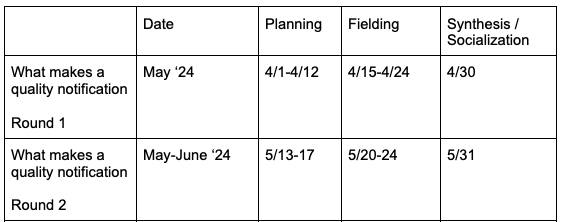
Timeline
Key Findings + Deliverables
User Sentiment Baseline
Insights into current user perceptions of Dropbox notifications, highlighting key pain points and opportunities for improvement.
Definition of “Notification”
A clear definition of what constitutes a notification, including delivery channels and the essential information required for it to be valuable to users.
Notification Framework
A categorized framework of notification types, including recommendations for prioritization, intensity, and delivery methods.
Notification Noisiness Model
A spectrum that characterizes the level of "noisiness" for different notifications.
Artifacts
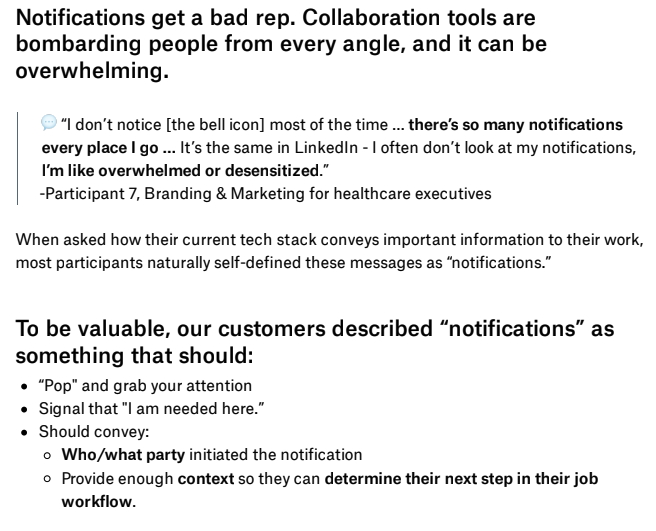
Section from the final report, including what a good notification looks like and supporting evidence
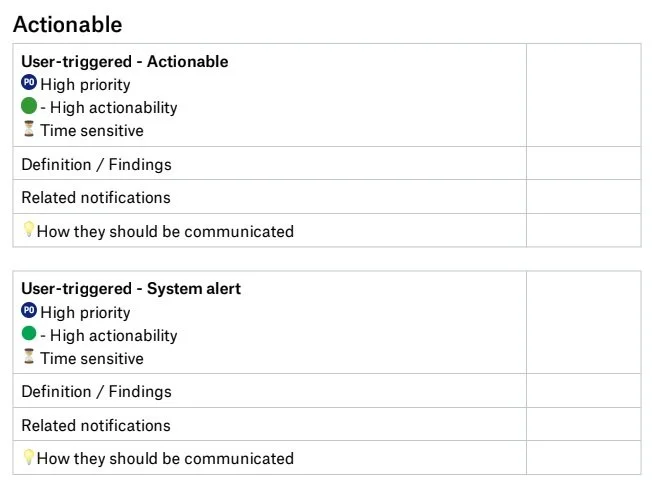
Format used for the “notification framework,” which includes definitions, related notifications, and other factors. Some information has been redacted for confidentiality.
Business Outcomes
Design Guidelines: Development of design-led, cross-platform notification guidelines to ensure consistent and impactful user experiences.
Strategic Direction: Contributions to Design’s Northstar Vision for reimagining the notification system.
Engineering Improvements: An initiative to enhance notification categorization based on the proposed framework, added to the backlog pending completion of a tool migration effort.
Study 2: Notifications for Teams
Problem statement
At the time, Dropbox for Business was a company-wide priority. This study specifically focused on users collaborating in teams and aimed to identify notification needs based on whether the user was an admin or a team member.
Research Questions
How do team roles (e.g., admin, member) influence notification expectations for delivery and control?
What team-specific actions should notifications prioritize?
How should Dropbox integrate admin-related notifications into familiar interfaces?
I worked with
A core team of Product, Design, and Engineering partners who were owning the Dropbox notification system on Dropbox Web browser.
I also collaborated with UX Researchers on Dropbox Teams and Growth teams, as these teams own the Admin Dashboard and various “notification-like” experiences that focus on team expansion (a company priority).
Methodology
Group interviews
8 moderated group interviews with admins and their team members, including co-design sessions in FigJam to design their “ideal” system.
Recruitment
Screener survey sent through email targeting team admin accounts. In the screener, respondents were asked if they can invite 1-2 team members that have a typical Dropbox use case for their company.
Total n-count: 8 admins, 8-16 team members.
Session structure
First 30 minutes: Group interviews
Last 30 minutes: Admin-specific topics
Timeline

Artifacts
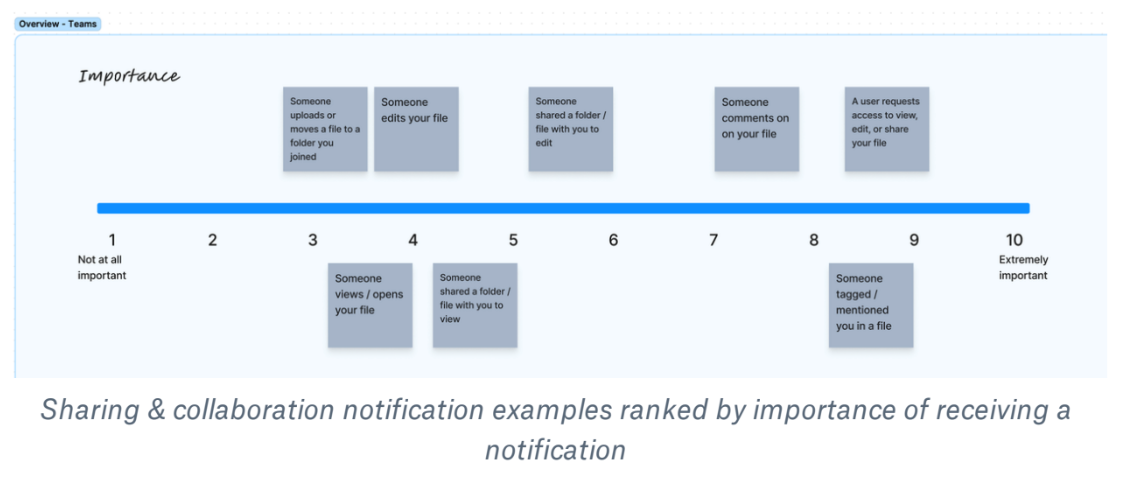
Importance of various notification types (average across participants), on a 1-10 scale
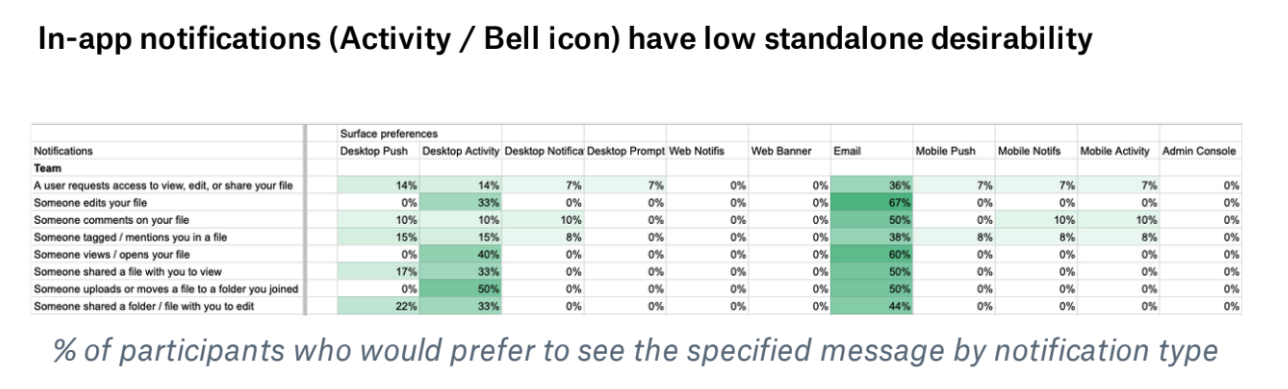
Data visualization - for important notifications, where would you want them delivered?
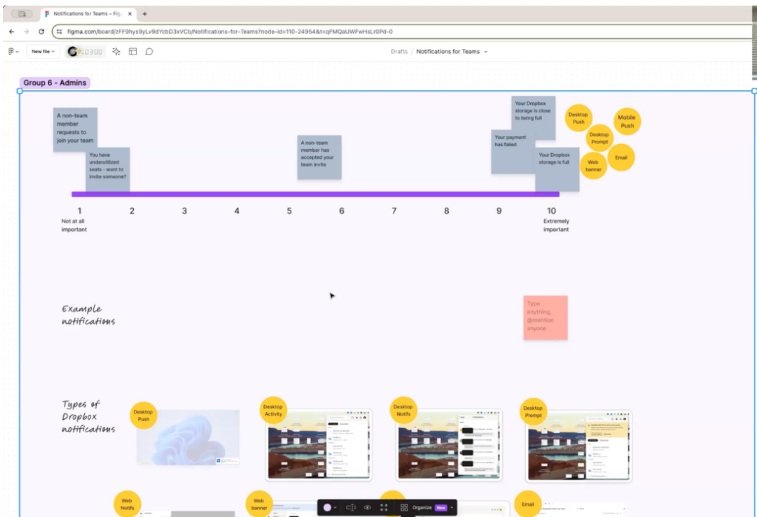
A participant’s final Figjam board. The participant was asked to rate different types of notifications by importance, and to indicate where they would want the notification shown. At bottom, visual aids were provided to show what communication channels were available.
Key Findings + Deliverables
Channel Prioritization
Insights into which notification channels (e.g., email, in-product, mobile, or web) should be prioritized for maximum impact.
Admin-Specific Notifications
Recommendations on how to effectively manage notifications tailored for admins.
Dark Patterns
Identification of problematic tactics in Growth-led campaigns aimed at driving team expansion.
Timing and Relevance Issues
Examples of poorly timed or irrelevant notifications and their negative impact on overall user engagement.
Business Outcomes
Cross-Platform Initiative Support: Increased Design and Product focus on creating a cohesive, cross-platform notification strategy.
Growth Experiment Guardrails: Safeguards implemented to prevent harmful practices in future Growth experiments.
Engineering Cost Savings: A planned update to notification retention policies (in backlog), projected to save $500,000 annually.
Study 3: Notifications vs Activity
Problem statement
The Desktop and Mobile applications present "notification-like" information through two distinct sections: "Activity" and "Notifications." However, this "Activity" section is not available on Dropbox Web. Could there be an opportunity to streamline and unify the information architecture across all Dropbox platforms?
Research Questions
Do users differentiate between "notifications" and "activities" in meaningful ways?
What is the potential for unifying notifications and activity feeds into a single, streamlined interface?
Methodology
Card sorting
Card sorting exercises to categorize messages as "notification," "activity," or both.
Unmoderated concept review + task completion
24 unmoderated tests across desktop, mobile, and web prototypes to explore mental models and compare design concepts.
Timeline

Key Findings + Deliverables
Message Type Analysis
Evaluation of message types and whether users categorized them as a “notification” or “activity.”
User Mental Models
Differences in how users perceive “notifications” versus “activity.”
Design Feedback
Insights on which design concept performed better across platforms (web, mobile, desktop).
Business Outcomes
Unified Approach: Alignment on adopting a consistent treatment for notifications and activity across all platforms.
Content Design Impact: Considerations for how top-level surfaces where Dropbox communicates with users should be structured.
Socialization
Session attendance + daily & weekly updates
UX Research is well-integrated into Dropbox’s design and product culture, making cross-functional participation in research sessions common.
For each interview session:
Invites go out to a pre-selected group of interested observers.
Sessions are conducted as Zoom Webinars to prevent large audiences from affecting participants.
A discussion thread is created in the research project’s Slack channel.
For data collection that spans more than one week:
End of Week recap: Share key insights and set expectations and alignment on study timelines, areas requiring partnership, and final research delivery.
For moderated interviews spanning multiple days:
Daily Slack recaps: Key observations and reminders for upcoming sessions.
[Occasional] Cross-functional debriefs: 15-20 min sessions to discuss key findings, implications, and any needed adjustments to
the discussion guide.
Asynchronous video “chapters”
Due to Dropbox’s remote and documentation-heavy environment, the work culture has a bias for “async first” information delivery and a negative bias toward meetings. Video presentations work well, especially for leadership, who don’t have the time to read an entire research report.
I started creating short video readouts, or “chapters” to summarize the key findings for each report. The idea is that most people will not want to sit through a 20 minute presentation, but might be interested in specific topics.
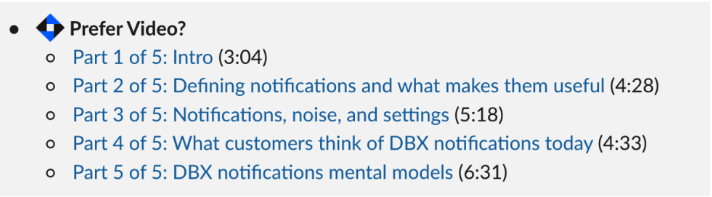
An example of video readout “chapters” published as part of a Slack research announcement in #insights (UXR announcement channel).
Cross-functional roadshow
Standalone research shareouts are rare (and can be poorly attended). Instead, I shared the most pertinent findings at pre-existing meetings and team rituals, such as:
Weekly Product Area Leads Syncs
Design Crits
Reflection
Research impact
The Dropbox Notifications Research Program delivered a comprehensive framework to reimagine how notifications can drive user engagement and provide platform value. Key deliverables included:
Notification Categorization Taxonomy
A systematic classification of notifications by priority, actionability, and context.
Cross-Platform Notification Guidelines
Best practices for delivering consistent, impactful notifications.
Unified Feed Design
A user-centric approach to combining notifications and activities into a cohesive experience.
Reflection
What worked well
Early Stakeholder Involvement
Engaging a broad group of stakeholders early in the research planning process enriched the research questions and expanded its triangulation impact. For example, in the "Notifications for Teams" project, researchers focusing on Admin and Team Activation experiences were included.
Group Interview Formats
Conducting group interviews with admins and their team members provided valuable insights and set a useful precedent for exploring perspectives from both roles.
Team Engagement via Communication Channels
Creating a #notifications-research Slack channel and hosting moderated interviews as Zoom webinars encouraged team members across Engineering, Product, and Design (EPD) to engage with the research and hear directly from customers.
What could be improved
Follow-Up Quantitative Studies
Some planned surveys to explore customer segmentation nuances were deprioritized due to shifting company priorities, leaving gaps in quantitative insights. The questions hoped to be addressed include:
By industry and firmographic (company/team size, etc), what notification types do users find most valuable and why?
What frequency would you want this notification, and how would you want it to be delivered?
Over-Researching Quality Notifications
The Round 2 unmoderated card sort delivered limited new insights. Despite the goal of targeting specific user segments, the study didn’t achieve a meaningful sample size through UserTesting recruitment.
Engineering and Sponsor Alignment
Stronger collaboration with engineering teams could help fast-track the implementation of recommendations. Additionally, more proactive engagement from the functional sponsor could drive cross-functional alignment on product requirements that extend beyond the team’s immediate scope.
Future research opportunities
Deep dive into notification management in large organizations.
Explore user preferences for notification settings and customization
Assess experience when users interact with Dropbox notifications across multiple devices.